Projects
AWS Projects
Serverless Web Application
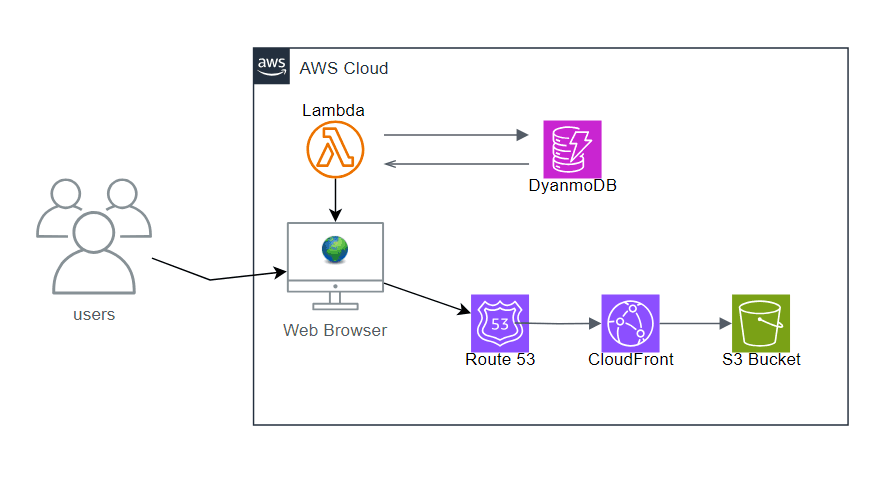
This serverless web application is hosted on AWS, utilizing S3, CloudFront, Route 53, Lambda, and DynamoDB. The frontend is stored in an S3 bucket and delivered globally through CloudFront, ensuring low-latency access for users. Route 53 handles domain name resolution, directing traffic efficiently.
On the backend, AWS Lambda processes user requests from the web browser, executing business logic without the need for dedicated servers. DynamoDB serves as the NoSQL database, enabling seamless create, read, update, and delete (CRUD) operations. The expected outcome of this project was to build a fully functional, scalable serverless application, providing hands-on experience with AWS services.
Static Web Hosting
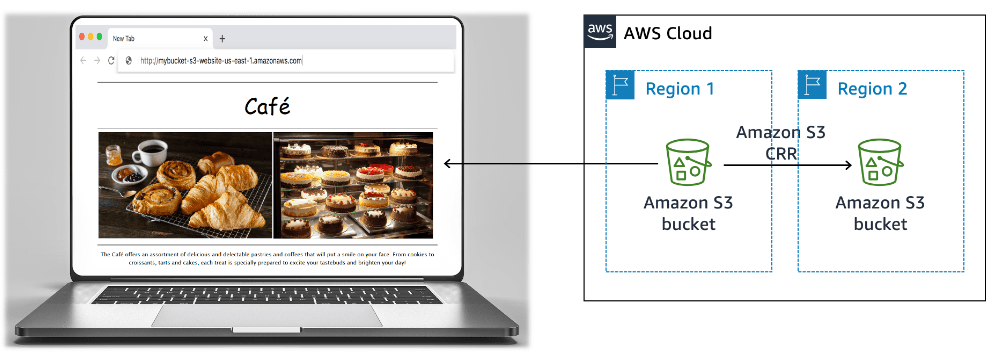
This solution diagram represents a static website hosted on Amazon S3, ensuring public accessibility while incorporating resilience and cost optimization features. The website content is stored in an S3 bucket, which is publicly readable, allowing users to access it through a web browser.
To enhance durability and disaster recovery, Cross-Region Replication (CRR) is enabled, automatically copying data from the primary S3 bucket in Region 1 to a secondary bucket in Region 2. Versioning is implemented to protect against accidental deletions or overwrites, while lifecycle policies help optimize storage costs by transitioning older or infrequently accessed files to cost-effective storage classes.
Dynamic Website
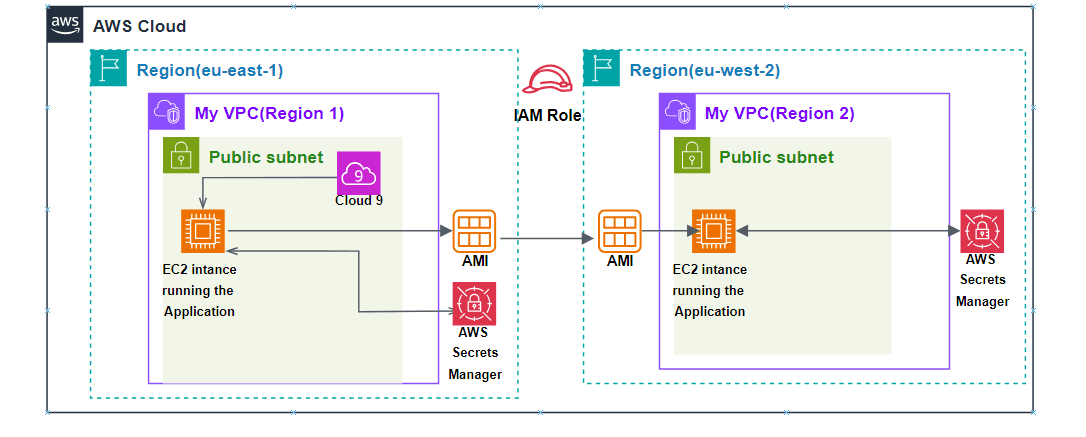
This solution diagram represents a highly available and secure deployment of a café application running on Amazon EC2 instances across multiple AWS regions. The application is initially launched in Region 1 within a public subnet, where an EC2 instance runs the café application.
An Amazon Machine Image (AMI) is created and replicated to Region 2 using IAM roles to facilitate Cross-Region Replication, ensuring redundancy and failover capability in case of regional outages. AWS Secrets Manager is utilized in both regions to securely centralize and manage sensitive credentials, such as database passwords and API keys.
Migrating a database to Amazon RDS
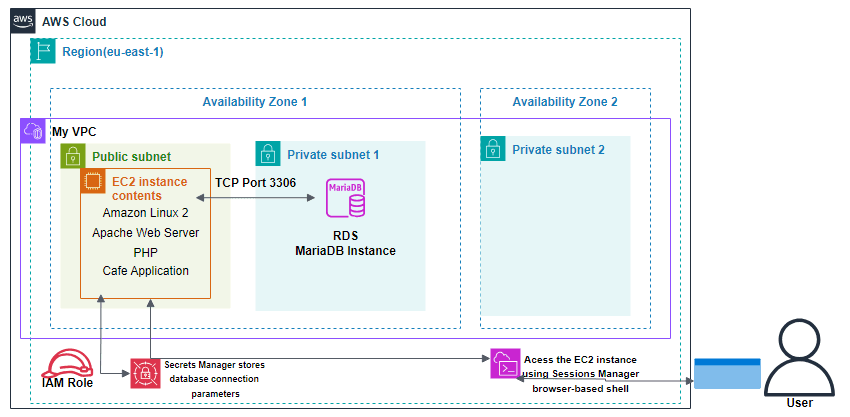
In this solution, a web application runs inside a VPC on an EC2 instance in a public subnet, using Amazon Linux 2 with an Apache web server, PHP, and a café application. Data is stored and managed in an RDS MariaDB instance in a private subnet for a more secure database environment, communicating with the EC2 instance over TCP port 3306. Database credentials are managed securely through AWS Secrets Manager, with an IAM Role granting the necessary permissions, and access to the EC2 instance goes through AWS Systems Manager Session Manager rather than SSH.
Migrating data involves exporting from the original MariaDB database using mysqldump, then connecting to the RDS instance with a SQL client to import it. Afterward, the web application's connection settings are updated to point to the new RDS endpoint using the credentials stored in Secrets Manager, giving the application a scalable and secure database while maintaining controlled access through IAM roles and AWS security best practices.
Creating a VPC Network Environment
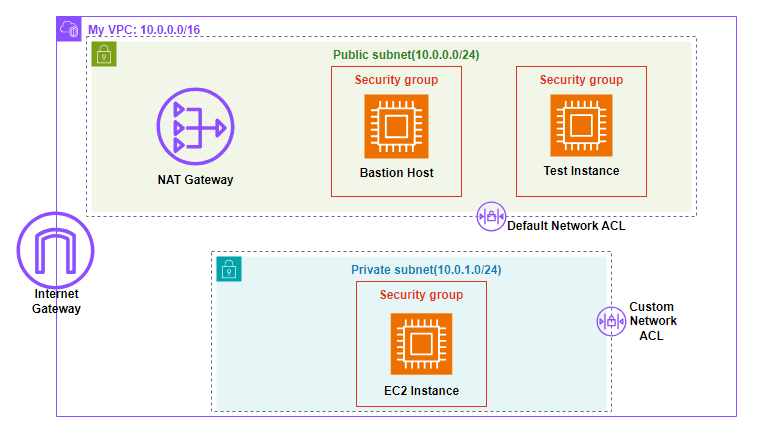
This solution sets up a secure VPC environment with both public and private subnets, allowing controlled access to private resources while enabling outbound internet connectivity. The public subnet hosts a Bastion Host and a Test Instance, both protected by security groups and governed by the Default Network ACL. The private subnet hosts an EC2 instance, shielded from direct internet access by a Custom Network ACL.
The Bastion Host serves as an intermediary, allowing secure SSH access to the private EC2 instance without exposing it to the internet, while a NAT Gateway enables outbound internet access for updates and external communication without allowing inbound access. Security groups and Network ACLs together regulate traffic at both the instance and subnet level, restricting direct exposure while enabling necessary connectivity within a controlled environment.
Creating a Scalable & Highly Available Environment
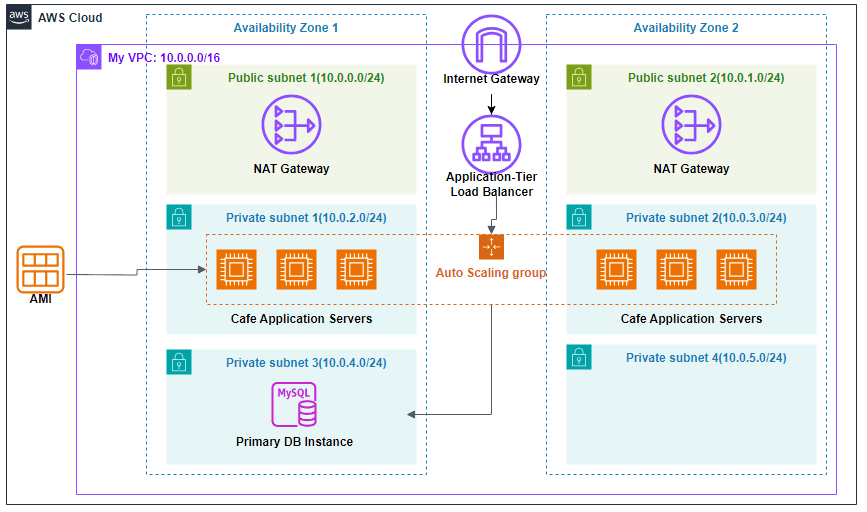
This solution establishes a highly available and scalable web application infrastructure within a VPC spanning multiple Availability Zones, with public and private subnets in each for redundancy and fault tolerance. Public subnets host NAT Gateways for outbound internet access, while private subnets house the application servers and a MySQL Primary DB Instance. An Application Load Balancer distributes traffic across the application servers, which are managed by an Auto Scaling Group to maintain performance and availability.
Setting this up involves defining subnets across Availability Zones with proper routing, configuring the Application Load Balancer's target groups and listener rules, and creating a launch template specifying the AMI, instance type, security groups, and user data scripts the Auto Scaling Group will use. Testing is done by sending traffic to the Load Balancer's DNS name and observing how requests distribute across instances, and by generating load with stress tools to watch the Auto Scaling Group dynamically add or remove instances to maintain performance.
Front-end Projects
My Portfolio
View repoThis site itself — built with Next.js App Router, TypeScript, and Tailwind CSS v4, deployed on Vercel. Beyond the standard pages, it includes a site-wide AI chat widget built on the Vercel AI SDK and backed by Google's Gemini model, with a custom tool that looks up real project data and renders distinct states for a loading query, a found result, and a genuine error when nothing matches.
The chat widget and a reusable animated send button are covered by an automated test suite (Vitest, React Testing Library, and Playwright) wired into GitHub Actions, so a failing test blocks a pull request rather than reaching production. The chat's tool-calling states are mocked in tests rather than hitting the real API, and the end-to-end test intercepts the AI response at the network layer using the SDK's actual streaming format.
React Movie Search
View repoA movie search app built on the OMDB API, structured around an MVVM (Model-View-ViewModel) pattern instead of the flat component structure most React apps default to. Each page's Model holds pure business logic (searching, favoriting) with no React dependency, a ViewModel hook wires that logic into component state, and the View stays purely presentational — a separation that makes the core logic testable independently of any rendered UI.
Favorites persist to localStorage and stay in sync across the search and favorites views. The search input requires a minimum of two characters before querying the API, and failed or empty responses surface as an inline error message rather than a silent blank screen.
Accessible Components Playground
View repoThree ARIA-compliant components — a Modal, Tabs, and a Disclosure — built from scratch with React and TypeScript, then deliberately benchmarked against the equivalent components from shadcn/ui (built on Radix UI) to see where a from-scratch implementation actually falls short of a production-grade library.
The gaps are documented directly in the repo: the custom Modal doesn't use a portal, so it's vulnerable to CSS stacking-context bugs that Radix's DialogPortal avoids; it doesn't lock body scroll the way Radix does automatically; and its focus trap uses a plain DOM query rather than Radix's FocusScope, which handles dynamically-changing children and other edge cases the manual version doesn't.